Skip to content Sale now on Flatline 2Save $41.70 USD 30% off Sale now on Flatline 2Save $41.70 USD 30% off

PreFire

Eleven preamps.
One plugin.

Neural models of eleven hardware preamps across their full gain range.

Used by producers and mixersAdam 'Nolly' Getgood, Aaron Marshall, Geoffrey Day
$149.00 USD
Watch trailer

Saturation changes with the gain.

PreFire's neural models capture how each hardware preamp responds as you turn up the gain.

Features

Choose the preamp. Set the drive.

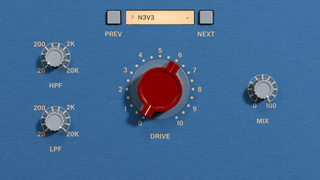
Select a model, adjust its gain, and blend the processed signal with the original using Mix.

PreFire interface

Drive

Controls the modelled preamp gain. We captured the circuit's non-linear response across the full range.

High pass filter

Cuts the lows.

Low pass filter

Cuts the highs.

Mix

Blend between wet/dry for parallel processing.

Model select

Select which preamp to use. 11 in total.

11 preamps

The hardware behind the models.

PreFire AP1 preamp model

01

Discrete Solid State · Rock & Pop

AP1

AP1 is a discrete solid-state model with a fast transient response and transformer colour.
PreFire BAE preamp model

02

Carnhill Transformer · Class A

BAE

BAE models a 1073-style Class A preamp with Carnhill transformers. It adds midrange weight and softens sharp transients on vocals, acoustic guitar, or piano.
PreFire FOCUS preamp model

03

Lundahl Transformers · Clean & Musical

FOCUS

FOCUS models a clean signal path with Lundahl input transformers.
PreFire GEMEL preamp model

04

Discrete Solid State · Pristine

GEMEL

GEMEL is one of the cleanest models in PreFire, with little added distortion.
PreFire GERMANIUM preamp model

05

Germanium Preamp

GERMANIUM

GERMANIUM adds strong harmonic saturation. Use it when vocals, drums, or synths need audible grit at the start of the chain.
PreFire MIDA preamp model

06

Legendary Live Console Preamp

MIDA

MIDA models a live-console preamp with a tight low end and forward top. Use it to add attack to drums, vocals, or guitars.
PreFire MILLENIUM preamp model

07

Transparent · Ultra-Low Distortion

MILLENIUM

MILLENIUM is an ultra-low-distortion model.
PreFire N3V3 preamp model

08

Iconic Class A Transformer

N3V3

N3V3 models a 1970s Class A transformer preamp. It adds dense midrange harmonics and a forward tone.
PreFire TIGI preamp model

09

Transformer-Balanced · Class A Console

TIGI

TIGI models a transformer-balanced Class A preamp with a discrete signal path. It adds top-end energy and a forward tone.
PreFire UNIVERSE preamp model

10

Warm Tube Vocal Preamp

UNIVERSE

UNIVERSE models a tube preamp from a vocal console. It adds warm, creamy midrange to vocals.
PreFire VBOX preamp model

11

Tube Preamp · Vocal Specialist

VBOX

VBOX is one of two tube models in PreFire. Use it to add low-mid weight to vocals or bass guitar.

Free trial

Try PreFire free for 7 days.

No credit card. No obligation. Full plugin, full feature set.

Compatibility

System Requirements

macOS

Activation
iLok License Manager (free)
OS
macOS 10.13 or later
CPU
Intel or Apple Silicon
Formats
VST3 / AU / AAX

Windows

Activation
iLok License Manager (free)
OS
Windows 10 or later
CPU
Intel i5 or equivalent
Formats
VST3 / AAX

64-bit only. Internet required for download and activation. iLok dongle optional - activate to your computer.

iLok licensing
VST3 plugin format
Audio Units plugin format
AAX plugin format

Compatible DAWs

Any modern DAW supporting VST3, AAX, or AU. iLok License Manager →

Support

Frequently asked questions

What happens after I purchase?

This is a digital product. After purchase, you will receive an email with your download and activation information.

Do I need an iLok USB dongle?

No. The iLok dongle is optional. You can activate PreFire directly to your computer using the free iLok License Manager app.

How many activations do I get?

PreFire can be activated to 2 locations on your iLok account.

How do I install PreFire?

Use the download link in your order confirmation email, run the installer, then activate with your serial number in iLok License Manager.

Is there a trial version?

Yes. A free 7-day trial is available from the hero section near the top of the page.

Where should I use PreFire?

Use it anywhere you need harmonic color: individual tracks, instrument buses, drum buses, bass, guitars, vocals, or full-mix tone shaping.

How do I get help?

Artist reviews

What producers say.

Adam 'Nolly' Getgood

This is instantly my go-to saturation plugin, but it does so much more than just distort. The way the emulations give different transient characters and textures is so much fun to explore; I'm finding tracks to be distinctly more polished and upfront in a very addictive and pleasing way. Amazing work!

Adam 'Nolly' GetgoodProducer, multi-instrumentalist
Aaron Marshall

PreFire is a front runner in the modern class of plugins that take all of the thinking out of the equation. This is a well curated collection of circuits that allow you to prioritize character and attitude, over features for the sake of features. I have yet to find a use case where it doesn't just do what you expect of it, and with only four knobs. Less think, more do. BIG fan.

Aaron MarshallGuitarist/Songwriter, Intervals
Geoffrey Day

PreFire now gets loaded automatically on every new audio and midi track in my projects. There is so much subtlety in the way each device behaves, the kind of thing only top-tier neural network modeling can capture. What an insane value!

Geoffrey DayComposer, Atomic Heart

Customer reviews

What customers say.

Customer Reviews

Based on 62 reviews
90%
(56)
5%
(3)
3%
(2)
0%
(0)
2%
(1)
T
Tim H.
Good plugin with a few limitations

PreFire sounds great and models the original hardware perfectly. However, the price is quite high. Adding features like oversampling and automatic gain compensation would make it much better.

B
Benedikt R.
Sick Fire

Strong Kong

S
SUBHAJIT P.
Incredible plugin

It’s always on my master bus. It does something that I cannot achieve otherwise.

A
Aden
Pre Fire - The Goat

One of the best plugins I’ve ever owned, best sounding modulations there is!

d
darko S.
The best pre

The best.

C
Connor H.
Best way to add color

It does such a great job emulating the real sound and vibe of hardware preamps. Perfect way to add some color to clean recordings and doubles as a great saturator for vocals